Account
Billing and plan changes
This page explains how to choose a plan when your trial ends, switch between plans or billing periods, update your payment details, find your invoices and cancel. Payments are handled by our payment provider, Paddle. For what each plan includes, see Plans and limits.
Where to manage your plan
Billing lives on your account settings page. In the app, click your name or avatar in the top-right corner and choose Manage Account. The Profile Information section shows your Subscription plan and these Actions:
- Change plan opens the pricing page.
- Change payment method lets you update your card details with Paddle. It's shown while you have a subscription you haven't cancelled.
- Cancel plan cancels your subscription.
- View invoices, under your plan name, opens your invoices.
Cancel plan and View invoices only appear while you have a paid subscription.
You can also reach the pricing page from the View Plans and Upgrade buttons that appear in the app when you hit a plan limit, or from Pricing at the top of the account pages.
Choosing a plan
Use this when you're on the trial, or your plan has expired.
- Open the pricing page. It shows Your current plan is: followed by your plan, for example Plus (trial).
- Choose Monthly or Annual billing with the switch at the top. Annual is selected by default.
- Click Sign up on the Basic, Plus or Business card.
- Complete the payment form from Paddle.
When the payment is complete, you're taken back to the dashboard. Your new plan's limits apply as soon as Feed Control receives the subscription from Paddle.
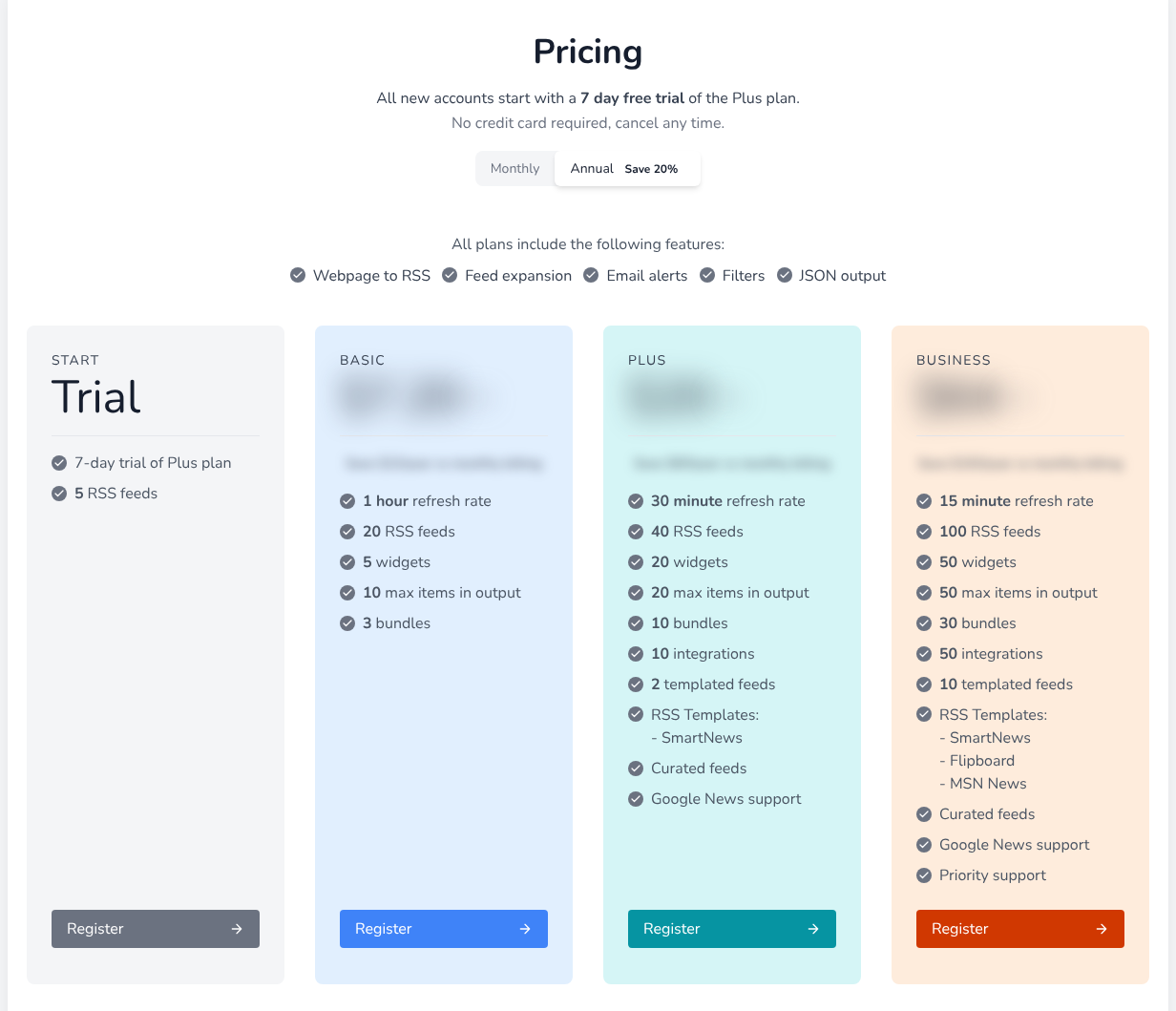
Monthly or annual billing
Every paid plan can be billed monthly or annually. Annual billing is marked Save 20% on the pricing page. Fees are billed in advance for the period you choose.
To move an existing subscription between monthly and annual billing, follow Switching plans and choose the billing period first. You can change the plan and the billing period in one step.
Legacy plans: if your plan card is labelled (LEGACY), you can't switch to annual billing yourself. Contact support to move to an annual plan.
Switching plans
With an active subscription, the pricing page is titled Change plan. Your current plan's card shows Current plan, and the others show Switch to Basic, Switch to Plus or Switch to Business.
- On the pricing page, choose Monthly or Annual.
- Click Switch to Basic, Switch to Plus or Switch to Business.
- Check the confirmation page. It previews whether you'll be charged a prorated amount now, and the amount and date of your next payment.
- Click the Yes, switch to button to confirm, or No thanks to go back.
When the switch is done, you'll see Switched!. It may take a minute before the app shows your new plan.
Upgrades and downgrades are prorated: any difference you owe is charged straight away. If you move to a smaller plan, check Changing to a smaller plan first to see what stops working.
Note: You can only switch an active subscription. If you've cancelled and your plan hasn't ended yet, choose a plan with Sign up instead, as in Choosing a plan.
Changing your payment method
- Open Manage Account.
- Under Actions, click Change payment method.
- Enter your new card details in the Paddle form.
Invoices
To see your invoices, click your name or avatar in the app and choose Invoices. You can also use View invoices on the account settings page.
The Your Invoices page lists each payment with its Date, Amount and Status. Click View to open the receipt for that payment.
If you don't have a subscription yet, the page shows No invoices found and a View Pricing Plans button.
Cancelling your plan
- Open Manage Account.
- Under Actions, click Cancel plan.
- On Cancel subscription?, click Cancel.
You'll see Cancelled. Your plan stays active until the end of the period you've paid for. If you open the cancel page again, it shows Already cancelled with the date your plan ends.
When that date passes, your plan expires and your feeds stop updating. See When a trial or plan expires. To continue later, choose a plan on the pricing page.
There's nothing to cancel during the trial: it ends on its own, and the cancel page shows the date it expires.
For refunds, see the terms of service. To close your account completely, cancel first and then delete your account.
Plans invoiced directly
Some accounts are invoiced directly rather than through Paddle. If yours is, the pricing page says your subscription is managed through alternative invoicing, and your invoices don't appear on the Your Invoices page. Contact support to change your plan or get invoice details.
Can't find what you need? Contact support.