Webhooks
Testing and delivery history
This page shows how to check that your webhook works: sending a test webhook from Feed Control, trying requests out with a request inspector, reading the delivery history, and finding out why a delivery failed. It assumes you've already set up a webhook.
Send a test webhook
You don't have to wait for a feed to publish something new to see whether your endpoint works.
- Click Integrations in the left-hand menu and open your webhook integration.
- Click Send test webhook.
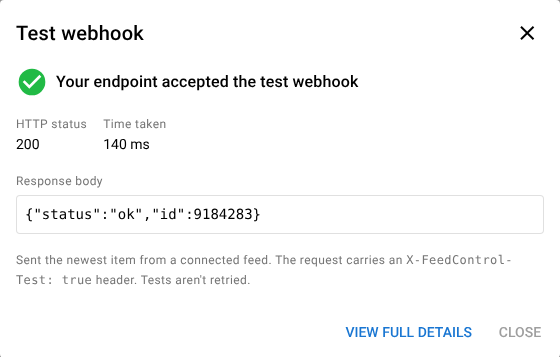
- Wait for the Test webhook dialog to show the result.
What's sent:
- The newest item from the integration's connected feeds, in exactly the same format as a real delivery. If none of the connected feeds has items yet, or only bundles are connected, Feed Control sends a sample item instead (title
Test webhook from Feed Control,id0). The dialog tells you which it sent. - An
X-FeedControl-Test: trueheader, so your handler can tell tests apart. Because a test of a real item is a delivery of its own, it has its ownIdempotency-Keyand won't be dropped as a repeat of an earlier delivery. If your handler skips items whoseidit has already seen, though, it may skip the test.
The dialog shows:
- Your endpoint accepted the test webhook or The test webhook failed
- HTTP status: the status code your endpoint returned, or No response
- Time taken: how long the request took
- Problem: the type of failure, such as Timed out or Not found, with a hint about how to fix it
- Response body: the start of what your endpoint answered
Click View full details to open the delivery in Event Logs, with the request that was sent and your endpoint's full response.
Good to know:
- Test sends go out even when the integration's Active setting is off, so you can check your endpoint before switching it on.
- Tests aren't retried.
- Tests appear in Recent Deliveries and Event Logs with a Test label and count in the delivery figures, but they're left out of the daily failure email.
- You can send up to 10 tests a minute. If you send more, wait a moment and try again.
Try it with a request inspector
To see exactly what Feed Control sends before you write any code, point a webhook at a request inspector, a website that gives you a temporary URL and shows every request sent to it. Webhook.site is one such service; there are others.
- Open the request inspector and copy the unique URL it gives you.
- In Feed Control, create a webhook integration with that URL, or edit an existing one.
- Click Send test webhook.
- In the request inspector, open the request to see the headers and the JSON body.
Anyone who knows an inspector URL can usually see what's sent to it. Use one only for testing, don't connect feeds with private content, and delete the integration (or change its URL back) when you're done.
Test with real items
To see real deliveries without waiting for new articles, use a feed you've added just for testing:
- Connect the test feed to your webhook integration.
- Open the feed, click Actions and choose Delete all feed items, then click Delete to confirm.
- Click Actions again and choose Fetch Feed Items.
Feed Control now finds the feed's current items again and treats them as new, so it sends a webhook for each one (unless the feed's filters remove it). Deleting a feed's items also deletes their delivery history, so don't do this on a feed you rely on.
Recent deliveries
The integration's page shows its last 10 deliveries under Recent Deliveries, newest first, with a summary such as "120 sent · 117 delivered · 3 failed · 97.5% success".
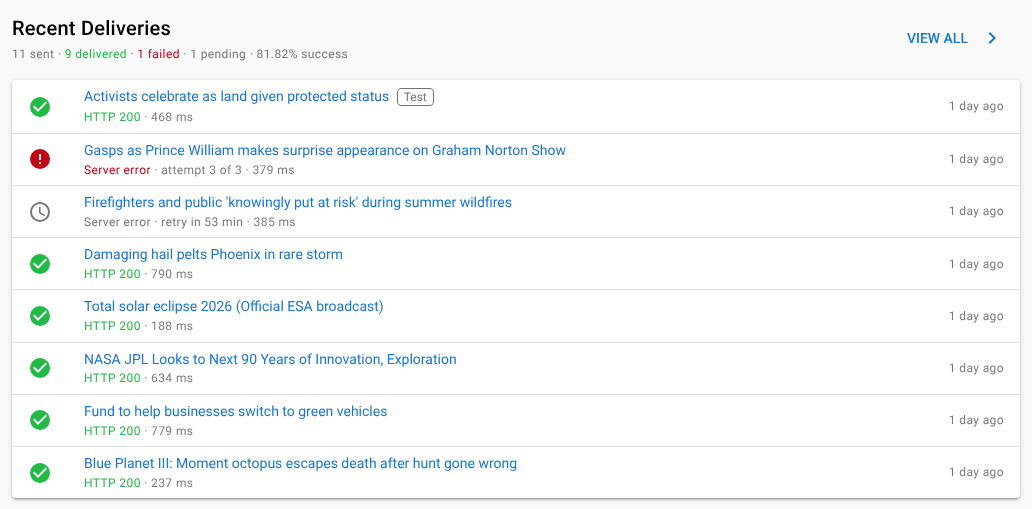
Each row shows:
- an icon: a green tick for delivered, a red error for failed, a grey clock for pending (waiting for its first attempt or for a retry)
- the item's title, with a Test label for test sends
- the outcome: the HTTP status for a delivery, or the reason it failed, and when the next automatic retry is due (for example "Server error · retry in 52 min")
- the attempt number once a delivery has been retried (for example "attempt 2 of 3") and how long the request took
- how long ago the delivery was created
Click a row to open that delivery's details. Click View all to open Event Logs filtered to this integration. Deliveries are kept for 14 days. See Event logs.
Why a delivery failed
Open a failed delivery from Recent Deliveries or Event Logs to see its details.
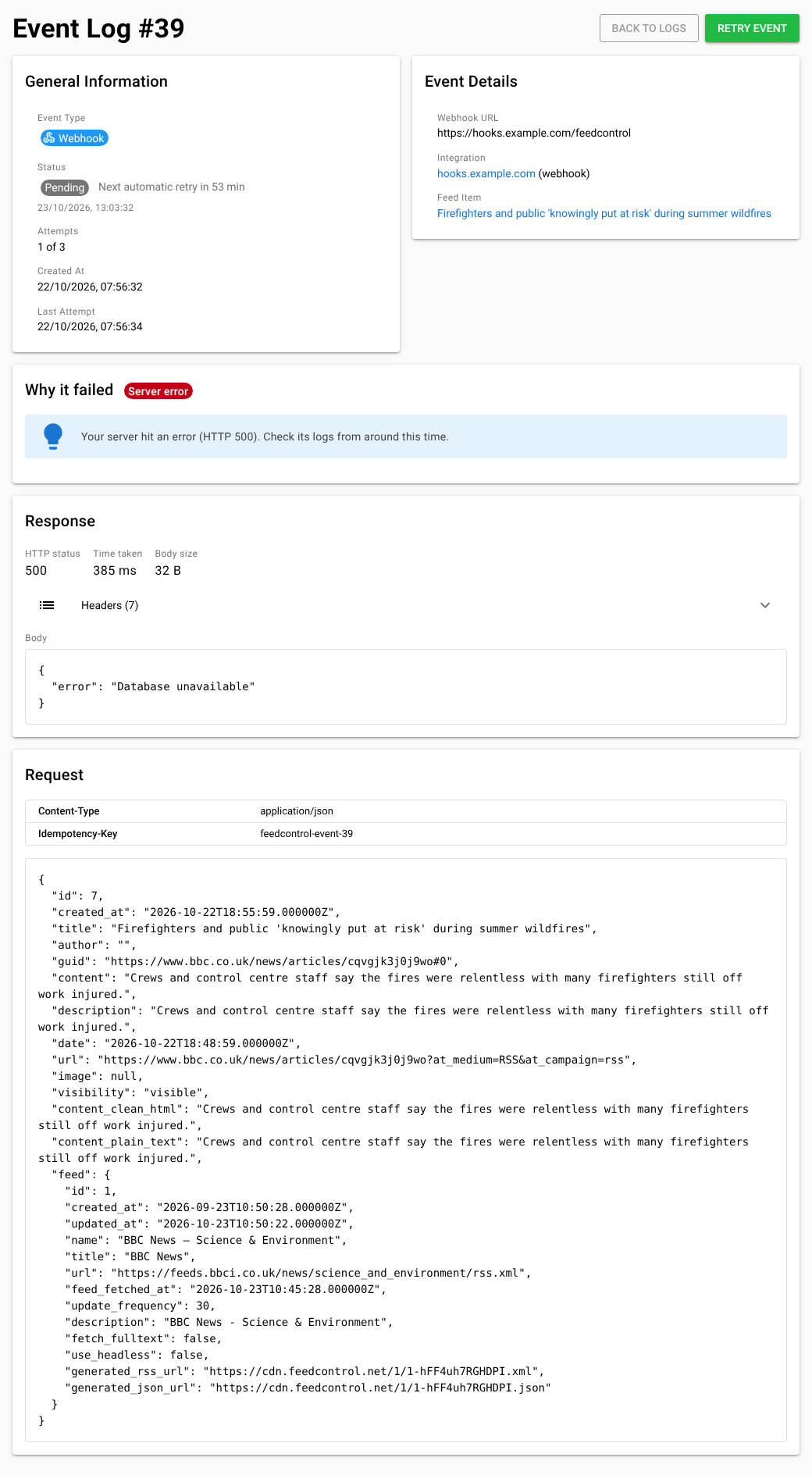
- General Information shows the status, whether and when it will be retried (for example "Next automatic retry in 52 min" or "No more automatic retries"), the number of attempts so far, and when the last attempt was made.
- Event Details shows the webhook URL the delivery was sent to, the integration and the feed item.
- Why it failed names the problem and gives a hint about how to fix it, along with the error message when there was no HTTP response (for example a timeout or a certificate error).
- Response shows what your endpoint answered for the latest attempt: the HTTP status, time taken, body size, the response headers and the body.
- Request shows the headers Feed Control sent (
Content-Type,Idempotency-Keyand, for tests,X-FeedControl-Test) and the JSON payload.
The most common problems with webhooks:
| Problem | What it usually means |
|---|---|
| Timed out | Your endpoint didn't answer within 30 seconds. Respond as soon as the request arrives and do slow work afterwards. |
| Host not found | The host name in the URL doesn't exist. Check for typos and your DNS settings. |
| Connection failed | Your server isn't running, or a firewall or IP allowlist is blocking the request. |
| TLS/SSL error | The HTTPS certificate is invalid, expired, for another host name, or missing intermediate certificates. |
| Redirected | Your endpoint answered with a redirect. Webhooks don't follow redirects, so use the final URL. |
| Not authorised | Your endpoint refused the request (401 or 403). Check the token in your webhook URL. |
| Not found | Nothing answers at that path (404 or 410). Check the path in the webhook URL. |
| Too large | Your server rejected the body as too large (413). Raise its request size limit: items with full article text can be big. |
| Rejected | Your endpoint returned another 4xx status. Its response body usually says why. |
| Server error | Your endpoint returned a 5xx status. Check your server's logs from around that time. |
| Blocked address | The URL points to a private or internal network address. Webhooks are only sent to the public internet. Not retried. |
| Switched off | The integration or connection was switched off when the delivery was due. Not retried. |
For the full list of response codes and the retry schedule, see Request and payload reference.
Retry a delivery
Failed deliveries are retried automatically: about an hour after the first failure and two hours after the second. See Retries.
Once you've fixed the problem, you don't have to wait:
- Open the delivery and click Retry Event.
- Or, in Event Logs, tick several deliveries and click Retry Selected.
A manual retry gives the delivery one more attempt, even if its automatic retries have run out. It's sent to the URL the delivery was created with, so if you fixed the problem by changing the integration's Webhook URL, the retry still goes to the old URL. Use Send test webhook to check the new URL instead. For more about the event log, see Event logs.
What isn't shown
To keep your account and Feed Control safe, some details are left out of the delivery history:
- If a URL points to a private or internal address, the message says so but doesn't show which address the host name resolved to.
Set-Cookieresponse headers aren't stored.- Only the first 16 KB of a response body is kept, at most 50 response headers are kept, and very long header values are shortened.
Test your handler locally
Feed Control can't send webhooks to localhost or other private addresses. While you develop, either:
- simulate a delivery yourself with
curl, using a body copied from a delivery's Request section or from the example payload, or - expose your local server through a tunnelling service that gives you a public HTTPS URL, and use that URL for a test integration.
For example, to post a saved payload to a handler running on your machine:
curl -i -X POST "http://localhost:8000/feedcontrol-webhook.php?token=dev-token" \
  -H "Content-Type: application/json" \
  -H "Idempotency-Key: feedcontrol-event-1" \
  -H "X-FeedControl-Test: true" \
  --data @payload.json
Send the same command twice to check that your handler ignores the repeat.
Can't find what you need? Contact support.