Getting started
Plans and limits
Feed Control has a free 7-day trial and three paid plans: Basic, Plus and Business. This page lists what each plan allows, how the limits are counted, and what happens when a trial ends or you move to a smaller plan. For prices, see the pricing page.
Plans at a glance
| Trial | Basic | Plus | Business | |
|---|---|---|---|---|
| Length | 7 days | Monthly or annual | Monthly or annual | Monthly or annual |
| Feeds | 5 | 20 | 40 | 100 |
| Most frequent feed checks | Every 30 minutes | Every hour | Every 30 minutes | Every 15 minutes |
| Bundles | 10 | 3 | 10 | 30 |
| Widgets | 20 | 5 | 20 | 50 |
| Active integration connections | 10, any type | 1 webhook connection (no Slack or Discord) | 10, any type | 50, any type |
| Items in generated RSS/JSON | Up to 20 | Up to 10 | Up to 20 | Up to 50 |
| RSS templates | Standard, Legacy, SmartNews | Standard, Legacy | Standard, Legacy, SmartNews | Standard, Legacy, SmartNews, Flipboard, MSN article |
| Google News feeds | Yes | No | Yes | Yes |
| Headless browser for full text | Yes | No | Yes | Yes |
| New site configs for full text | Yes | No | Yes | Yes |
| Feeds using a proxy | 20 | 10 | 20 | 50 |
The trial gives you the Plus plan's features with a limit of 5 feeds. While you're on the trial, your plan shows as Plus (trial).
On every plan
- Webpage to RSS, full-text extraction, filters, email alerts and JSON output.
- Up to 50 For each new item email alerts per account per day. Daily, weekly and monthly summaries aren't affected by this limit. See Email alerts.
- Event logs are kept for 14 days. See Event logs.
- Up to 100 integrations (webhook URLs, Slack workspaces and Discord servers). This is separate from the limit on connections below: an integration can be connected to many feeds and bundles. See Integrations overview.
Need more? If the Business plan isn't big enough, contact support with your requirements.
Checking your usage
The sidebar's Manage Account entry shows your current plan and how many feeds you've used, for example Feeds: 12/40.
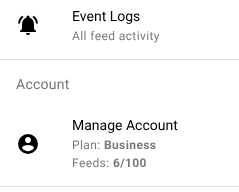
When you reach a limit, Feed Control won't let you add more of that kind of item until you remove some or upgrade. Screens such as Bundles and Integrations show a banner with a View Plans button when you're at the limit.
How limits are counted
Feeds
Every feed in your account counts towards the limit, including feeds whose Active setting is turned off. To make room, delete feeds you no longer need.
If you have more feeds than your plan allows (for example after moving to a smaller plan), the feeds you added first keep updating, up to the limit. The rest stop updating: they're highlighted in red in the Feeds list, and their page shows a Feed disabled. warning. They aren't deleted.
Check frequency
You can set Checked every on a feed's Source tab to anything from 15 minutes to 1 day, but Feed Control won't check a feed more often than your plan allows. On Basic, for example, a feed set to 15 minutes is still checked once an hour. See Source settings.
Integration connections
A connection is one integration attached to one feed or bundle. A Slack integration posting to the channels of three feeds counts as three connections.
- Only active connections count. A disabled connection stays attached but doesn't send anything.
- On Basic, the allowance is one active webhook connection. Slack and Discord aren't available.
- On Plus and Business, the allowance is shared between Slack, Discord and webhooks.
You can enable and disable connections on a feed's Alerts/Integrations tab or a bundle's Integrations tab: select them, then choose Enable selected or Disable selected from the table's Actions menu. If you try to enable more than your plan allows, the extra connections stay disabled. See Integrations overview.
Items in generated feeds
Generated RSS and JSON feeds include 10 items by default. You can raise Number of items to include on the Generate RSS/JSON tab up to your plan's maximum. See Generating RSS or JSON.
Plan-gated features
Google News feeds
Plus and Business plans: Google News feeds aren't available on Basic.
On Basic, the Google News card under Add feed is disabled and labelled Plus plan required. Google News feeds already in the account stop updating and show Updates paused — Google News feeds require a Plus or Business plan.
Headless browser
Plus and Business plans: the Use headless browser option on the Full text tab isn't available on Basic.
On Basic, feeds that already use the headless browser stop updating and show Updates paused — headless browser fetching requires a Plus or Business plan. To resume updates without upgrading, turn off Use headless browser on the feed's Full text tab. See Full-text extraction.
Site config
Plus and Business plans: you can't add a new Site config (advanced) on Basic.
Site configs you added before moving to Basic keep working.
RSS templates
Templates your plan doesn't include are marked [UPGRADE PLAN TO ENABLE] in the RSS Template list. If a feed uses a template that isn't in your plan, Feed Control stops generating its RSS output until you switch the feed to a template your plan includes. Standard is available on every plan.
When a trial or plan expires
When your trial ends without a subscription, or a cancelled subscription reaches its end date, your plan shows as Expired. Then:
- Your feeds stop updating, so no new items reach your generated feeds, widgets, bundles, email alerts or integrations.
- You can't add feeds, bundles, widgets or integration connections.
- Expiry doesn't delete your feeds or their settings, and it doesn't switch off your integration connections.
Choose a plan on the pricing page to start updating again. See Billing and plan changes.
Changing to a smaller plan
When you move to a plan with lower limits:
- Feeds: if you're over the new feed limit, your most recently added feeds stop updating until you delete enough feeds or upgrade again.
- Check frequency: feeds are checked no more often than the new plan allows.
- Google News and headless browser (moving to Basic): affected feeds stop updating, as described above.
- RSS templates: feeds that use a template the new plan doesn't include stop generating RSS output.
- Generated feeds: the number of items is capped at the new plan's maximum.
- Bundles and widgets: existing ones keep working, but you can't create more until you're under the new limit.
- Integration connections: connections you already have keep working, even if you have more than the new plan allows. You can't add connections, or turn disabled ones back on, until you're under the new limit. If you switch one off while you're over the limit, you won't be able to switch it back on until you've disabled others or upgraded.
Can't find what you need? Contact support.