Monitoring
Event logs
The Event Logs screen records what Feed Control does with your feeds behind the scenes: every webhook, Slack and Discord delivery, every scheduled feed check, every full-text extraction and every upload of a feed's generated files. Use it to confirm that something worked, find out why something failed, and send failed events again.
Opening event logs
Click Event Logs in the sidebar, or go to /nu#/event-logs. You can also get there from:
- an integration's page: View all under Recent Deliveries opens the event logs filtered to that integration
- the daily failure email: View All Failed Events opens the event logs filtered to failed events (see Failure notifications)
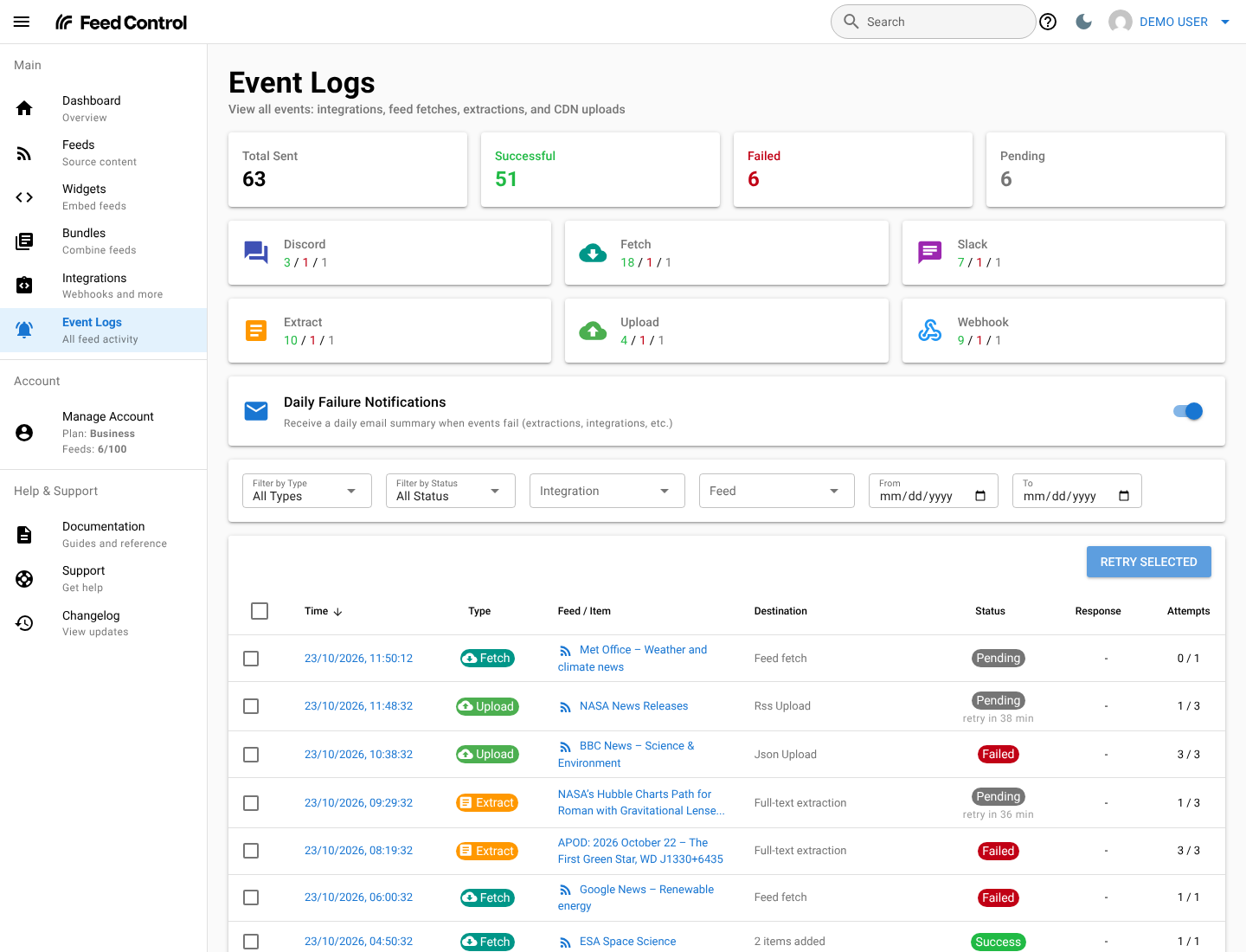
At the top of the screen, Total Sent, Successful, Failed and Pending count the events that match your filters, followed by a card for each event type showing its successful / failed / pending counts. The counts follow the Integration, Feed, From and To filters, but not the type and status filters.
Below the counts is the Daily Failure Notifications switch, which turns the daily summary email on or off. See Failure notifications.
What gets logged
Each row in the list is one event. Its type is shown as a coloured label in the Type column.
| Type filter | Label | One event is logged for | Destination column shows |
|---|---|---|---|
| Webhooks | Webhook | Each new item sent to a webhook integration, and each Send test webhook | The webhook URL |
| Slack | Slack | Each new item posted to a Slack channel | The channel |
| Discord | Discord | Each new item posted to a Discord channel | The channel |
| Feed Fetches | Fetch | Each scheduled check of a feed's source | How many items were added, for example 3 items added |
| Extractions | Extract | Each full-text extraction of an item, in feeds with Fetch full text turned on (including when you use Re-fetch content) | Full-text extraction |
| CDN Uploads | Upload | Each time a feed's generated RSS file, JSON file or widget data is published | Which file: RSS, JSON or widget |
The Feed / Item column links to the item the event was about, or to the feed for fetches and uploads. Test deliveries have a Test badge, and show Sample item when no connected feed had items yet.
Some things aren't logged:
- Fetches you start yourself with Actions > Fetch Feed Items on a feed's page. Only scheduled checks appear.
- Uploads of bundle RSS and JSON files. Only feed files and widget data are logged.
- Deliveries that were never attempted. Nothing is logged for an item when its feed is inactive, the integration's Active setting is off, the connection to the feed or bundle is disabled, the item was filtered out, or the feed is in curation mode. See Troubleshooting.
Statuses
| Status | Colour | Meaning |
|---|---|---|
| Success | Green | The event completed. For a webhook, your endpoint answered with a 2xx status code. |
| Failed | Red | The event didn't complete, and there are no more automatic retries. You can still retry it yourself. |
| Pending | Grey | The event is in progress, or it failed and is waiting for an automatic retry. |
When an event has failed, a short reason appears under its status, for example Timed out or Not found. Hover over the reason to see what you can do about it. A pending event that's waiting for a retry also shows when it's due, for example retry in 45 min.
The Response column shows the HTTP status code your endpoint, Slack or Discord answered with, and how long the request took. The Attempts column shows how many attempts have been made out of the number allowed, for example 1 / 3.
Failure reasons
| Reason | What it means |
|---|---|
| Timed out | The other end didn't answer in time. Webhook endpoints have 30 seconds to respond. |
| Host not found | The hostname in the URL couldn't be found in DNS. |
| Connection failed | Feed Control couldn't connect to the server. |
| TLS/SSL error | The secure (HTTPS) connection failed, for example because of an expired or mismatched certificate. |
| Redirected | Your endpoint answered with a redirect. Webhooks don't follow redirects. |
| Not authorised | The request was refused (HTTP 401 or 403), or Slack or Discord no longer accepts Feed Control's access. |
| Not found | Nothing answered at that URL (HTTP 404 or 410), or the Slack or Discord channel no longer exists. |
| App not in channel | The Feed Control app hasn't been added to the Slack channel. |
| Rate limited | The receiving service is limiting how many requests it accepts. |
| Too large | Your endpoint rejected the request as too large (HTTP 413). |
| Rejected | The request was refused for another reason. The response body usually says why. |
| Server error | The receiving server had an internal error (HTTP 5xx). |
| Missing setting | The integration is missing a setting, such as a token or channel. |
| Switched off | Not sent, because the integration or its connection to the feed or bundle is switched off. |
| Invalid URL | The webhook URL doesn't start with http:// or https://. |
| Blocked address | The webhook URL points to a private or internal network address. Webhooks can only be sent to addresses on the public internet. |
Troubleshooting explains how to fix each of these for webhooks.
Automatic retries
Feed Control retries most failed events on its own:
- Webhook, Slack and Discord deliveries, extractions and CDN uploads get up to 3 attempts. After the first failure, the next attempt is about an hour later; after the second, about two hours later. If the third attempt fails, the event is marked Failed.
- Feed fetches get one attempt and aren't retried. The feed is checked again at its next scheduled time.
- Test webhooks sent with Send test webhook aren't retried automatically.
- Webhooks to an Invalid URL or a Blocked address, and deliveries that are Switched off, fail straight away without retries, because retrying can't help.
If a delivery is interrupted part-way through, it's retried in the same way. If its last allowed attempt never finishes, it's marked Failed with the message Delivery did not finish (the worker stopped mid-send).
Every attempt at the same webhook delivery carries the same Idempotency-Key header, so your endpoint can recognise and ignore a repeat. See Request and payload reference.
Filtering the list
| Filter | What it does |
|---|---|
| Filter by Type | Shows one type: Webhooks, Slack, Discord, Feed Fetches, Extractions or CDN Uploads. |
| Filter by Status | Shows only Success, Failed or Pending events. |
| Integration | Shows only events for one integration. |
| Feed | Shows only events for one feed. |
| From and To | Shows only events created between these dates, including both days. |

Clear filters appears once any filter is set, and removes them all.
The filters are saved in the page address, so you can bookmark a filtered view or reload the page without losing it. For example, /nu#/event-logs?status=failed shows only failed events.
The list shows the newest events first, 50 to a page. Times are shown in your browser's time zone; the From and To dates are whole days in UTC.
Event details
Click the time in the Time column to open an event. The details screen shows:
- General Information: the event type, its status, and where it stands on retries (Delivered, Next automatic retry in …, In progress, or No more automatic retries), the number of attempts (for example 2 of 3), when the event was created and when it was last attempted.
- Event Details: where it went (the Webhook URL, Slack Channel and message layout, or Discord Channel) or what it worked on (the Feed URL, Article URL or Upload Type), with links to the integration and to the feed or item.
- Why it failed: the failure reason, a hint about what to do, and the error message.
- Response (webhook, Slack and Discord only): the HTTP status (No response if there wasn't one), Time taken, Body size, the response Headers, and the response Body. Bodies over 16 KB are cut to their first 16 KB.
- Request: for webhooks, the headers Feed Control sent and the JSON payload. For other types, a summary of what was sent or processed.
- Result (fetches, extractions and uploads): a summary of the outcome, such as the number of items added or the uploaded file's size.
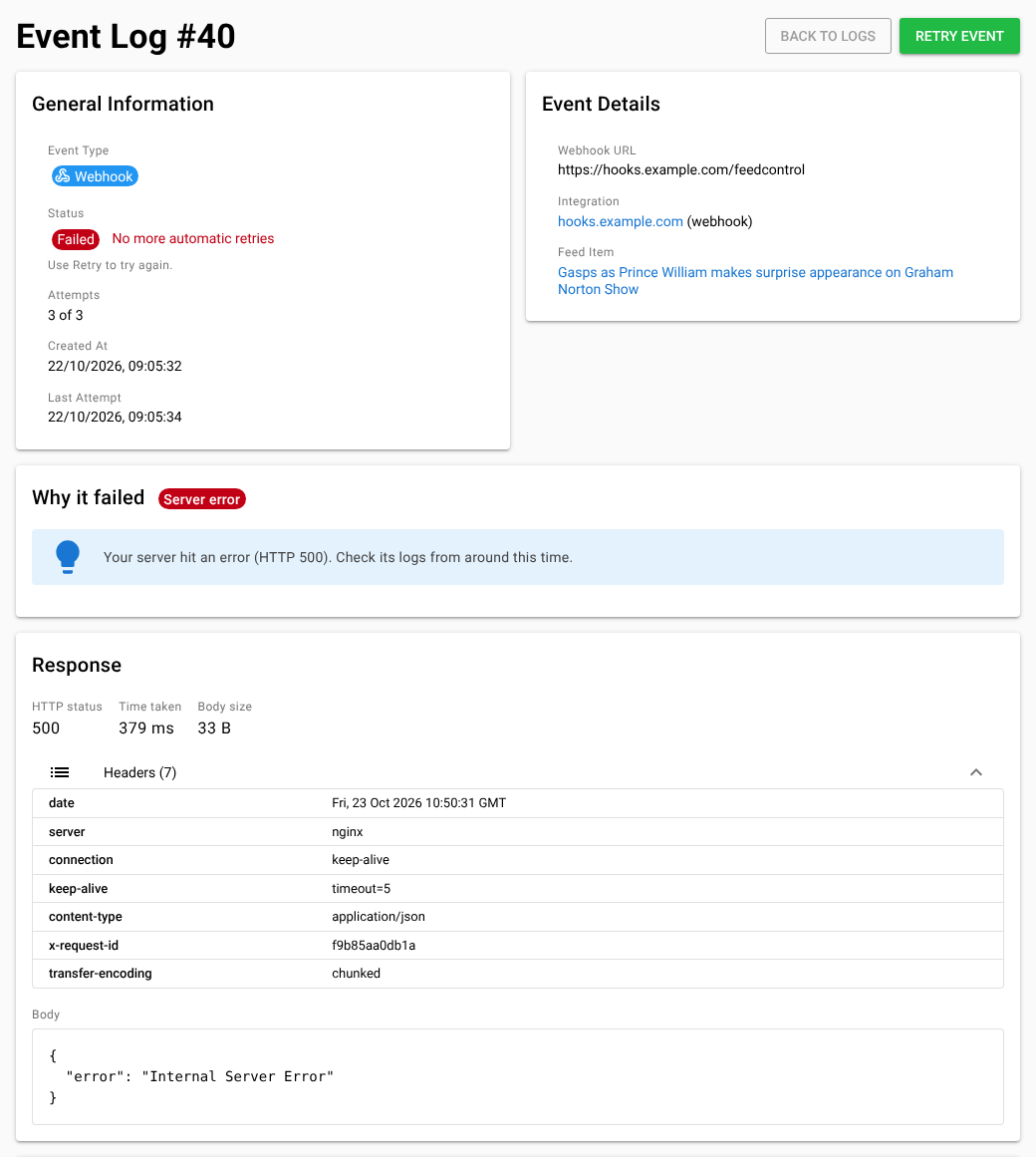
Click Back to Logs to return to the list.
Retrying events
You can retry any event that isn't Success, except feed fetches.
Retry one event
- Open the event from the list.
- Click Retry Event.
The button isn't shown for successful events or feed fetches.
Retry several events
- In the list, tick the checkbox next to each event you want to retry. Filtering by Failed first makes this easier.
- Click Retry Selected at the top right of the list. The button shows how many events are selected, for example Retry Selected (3).
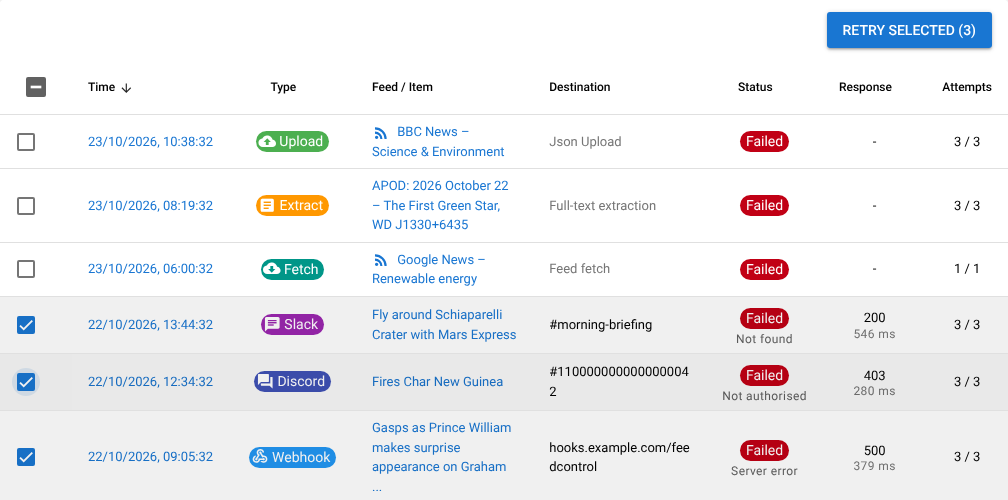
Successful events and feed fetches in your selection are skipped.
What a retry does
A retry is queued straight away. The event shows as Pending until the new attempt finishes, and a manual retry always gets one more attempt, even if the automatic ones are used up: an event that failed at 3 of 3 is retried as 4 of 4.
| Type | What happens |
|---|---|
| Webhook | The original payload is sent again to the webhook URL recorded on the event. |
| Slack | The message is rebuilt from the item, using the connection's current message layout, and posted to the channel recorded on the event. |
| Discord | The item's title and link are posted again to the channel recorded on the event. |
| Extraction | Full-text extraction runs again for the item, using the feed's current settings. |
| CDN upload | The RSS file, JSON file or widget data is generated again from the current items and published. |
| Feed fetch | Can't be retried. The feed is checked again at its next scheduled time. |
Note: A webhook retry goes to the URL the event was originally sent to. If you've since changed the integration's Webhook URL, retrying an older event still sends it to the old address. New items, and Send test webhook, use the new URL. See Testing and delivery history.
If the integration or its connection to the feed or bundle has been switched off, a retried delivery fails with Switched off. Switch it back on first. See Integrations overview.
How long events are kept
Events are kept for 14 days. Each day, events created more than 14 days earlier are deleted.
What event logs don't show
Some details are left out on purpose:
- Technical errors for fetches, extractions and uploads. These can name Feed Control's internal systems, so when one of these events fails it shows a plain message instead, and the technical error goes to Feed Control's own logs:
- Feed fetches: Something went wrong on our side while updating this feed.
- Extractions: Couldn't extract the full text of this article.
- CDN uploads: Something went wrong on our side while uploading this feed to the CDN.
- Internal addresses. A webhook URL that points to a private or internal network fails with This URL points to a private or internal network address., without naming the address it resolved to.
- Cookies.
Set-Cookieheaders from your endpoint's response aren't stored.
If you keep seeing a "something went wrong on our side" message for the same feed, contact support and include the event number shown at the top of its details screen (for example Event Log #1234).
Can't find what you need? Contact support.